
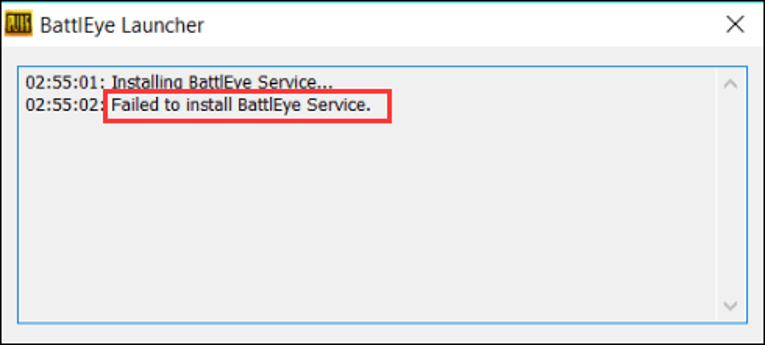
You’ve just fired up your PC, ready to dive into the chaos of Los Santos in Grand Theft Auto V Enhanced. The graphics are crisp, the streets are calling, and then—bam—an error message hits you like a runaway train: “Failed to start BattlEye service.”
Suddenly, your plans to cruise Vinewood or pull off a heist are on hold. If this sounds familiar, don’t sweat it.
You’re not alone, and this isn’t a game-over situation. As someone who’s spent countless hours troubleshooting gaming hiccups, I’m here to guide you through fixing this pesky issue step-by-step.
Let’s get you back behind the wheel—or the rocket launcher—where you belong.
What’s BattlEye, and Why Is It Ruining Your Day?
Table of Contents
Before we roll up our sleeves, let’s talk about what’s going on under the hood. BattlEye is an anti-cheat system baked into GTA V Enhanced to keep online play fair.
It’s like the bouncer at the club, making sure no one sneaks in with hacks or mods that could ruin the fun for everyone else. Rockstar rolled it out for GTA Online on PC in September 2024, and it’s now a must-have for the Enhanced version too.
When it works, it’s great—cheaters get the boot. But when it fails to start, it’s like the bouncer’s locked you out of the party.
This “Failed to start BattlEye service” error usually pops up because something’s gone wonky with the BattlEye software itself—maybe it didn’t install right, got corrupted, or is clashing with your system.
The good news? It’s fixable. Let’s break down the why and how with some real, actionable solutions.
Why This Error Happens: The Usual Suspects
Understanding the root cause is half the battle. Here’s what might be tripping up BattlEye:
- Corrupted BattlEye Files
Game updates or a bad shutdown can mess up BattlEye’s files. If even one piece is missing or broken, it won’t start. - Permission Problems
Windows can be picky about who gets to run what. If BattlEye doesn’t have admin rights, it might stall out. - Antivirus Overreach
Your antivirus might see BattlEye as a threat—it’s a kernel-level program, after all—and block it from launching. - Outdated Launcher or Drivers
An old Rockstar Games Launcher or graphics driver can throw a wrench in the works, especially with a beefy update like GTA V Enhanced. - Modding Mishaps
Love your single-player mods? If you’ve got leftover files from ScriptHookV or other tweaks, BattlEye might choke on them.
With millions of players—Rockstar reported over 190 million GTA V copies sold by late 2023—this error isn’t rare. A quick scan of Reddit or Steam forums shows it’s been a headache since BattlEye’s debut. Now, let’s fix it.
How to Fix “Failed to Start BattlEye Service”
Here’s your toolbox for getting BattlEye back on track. We’ll start simple and work our way up. Try these one at a time, testing the game after each step.
Step 1: Restart and Relaunch
It’s the oldest trick in the book, but it works more often than you’d think. Close GTA V, shut down the Rockstar Games Launcher, and reboot your PC.
This clears out any temporary glitches—like a stuck process—that might be holding BattlEye back. Launch the game again and see if it cooperates. No dice? Onward we go.
Step 2: Run Everything as Administrator
BattlEye needs the VIP treatment to function. Here’s how to give it the keys:
- Search for “Rockstar Games Launcher” in Windows Search, right-click it, and select “Open file location.”
- Right-click “LauncherPatcher.exe,” hit “Properties,” go to the “Compatibility” tab, and check “Run this program as an administrator.” Click “Apply” and “OK.”
- Do the same for “Launcher.exe” in the same folder.
Now, fire up the launcher and start GTA V Enhanced. This tweak often clears permission hiccups—tons of players on X swear by it.
Step 3: Reinstall BattlEye Manually
If BattlEye’s files are toast, let’s give it a fresh start:
- Navigate to your GTA V Enhanced folder (usually something like C:\Program Files\Rockstar Games\Grand Theft Auto V Enhanced).
- Find the “BattlEye” subfolder and double-click “BEService_x64.exe.” This reinstalls BattlEye from scratch.
- Restart your PC, then launch the game.
A buddy of mine fixed this exact issue last month after a patch scrambled his BattlEye setup. It’s quick and painless.
Step 4: Verify Game Files
Corrupted game files can drag BattlEye down with them. Let’s check:
- Open the Rockstar Games Launcher, go to “Settings,” and find “My Installed Games.”
- Select GTA V Enhanced and click “Verify Integrity.” The launcher will scan and replace anything that’s off.
- Once it’s done (could take 10-20 minutes), restart the launcher and try again.
Steam users can do this too—right-click GTA V in your Library, hit “Properties,” go to “Installed Files,” and click “Verify integrity of game files.” It’s like a digital tune-up.
Step 5: Tame Your Antivirus
Your antivirus might be playing overzealous guard dog. I’ve seen this with Norton and Windows Defender:
- Open your antivirus settings and add exceptions for:
- The Rockstar Games Launcher folder.
- The GTA V Enhanced folder (including the BattlEye subfolder).
- Alternatively, disable it temporarily while launching the game—just remember to turn it back on after.
One Redditor found their McAfee was quietly blocking “BEService_x64.exe.” Adding it to the whitelist fixed everything.
Step 6: Update Your Launcher and Drivers
An outdated launcher or GPU driver can clash with BattlEye’s shiny new code:
- In the Rockstar Games Launcher, check for updates under “Settings.”
- For drivers, head to NVIDIA, AMD, or Intel’s site (depending on your GPU) and grab the latest version. Or use GeForce Experience if you’re Team Green—it’s a one-click fix.
Rockstar’s support page notes this solved crashes for many after the Enhanced update dropped in 2025.
Step 7: Ditch the Mods (Temporarily)
If you’ve modded GTA V for story mode, those files might be stirring the pot. Look in your game folder for “dinput8.dll” or anything tied to ScriptHookV.
Move them to a backup folder outside the game directory, then try launching. You can bring them back later—BattlEye only cares about Online.
Real Stories, Real Fixes
Let’s ground this with a couple of examples. Jake, a gamer I know from a Discord server, hit this error after upgrading to GTA V Enhanced. Turned out his antivirus flagged BattlEye as suspicious.
Whitelisting it got him back online in 10 minutes. Then there’s a Steam thread from July 2025 where a player fixed it by reinstalling BattlEye manually after a botched update—same trick worked for dozens of commenters. These aren’t flukes; they’re patterns you can follow.
If All Else Fails
Still stuck? It’s rare, but you might need to reinstall GTA V Enhanced entirely. Uninstall via the Rockstar Games Launcher or Steam, delete the game folder, and download it fresh.
It’s a time sink—those 100+ GBs don’t move fast—but it’s a nuclear option that resets everything. If that doesn’t work, ping Rockstar Support with your system specs and error logs (find them in the game folder). They’re slow, but they’ll dig into edge cases.
Related: How to Fix Content Under Review on TikTok
Wrapping Up: Back to Los Santos
The “Failed to start BattlEye service” error is a speed bump, not a brick wall. Whether it’s a quick permissions tweak, a file refresh, or an antivirus truce, you’ve got plenty of ways to tackle it.
Start simple, work through the steps, and you’ll be tearing up GTA V Enhanced again before you know it. This isn’t just tech talk—it’s about reclaiming your gaming time. So, go on, give these fixes a shot, and let me know how it pans out. See you in the streets of San Andreas!